What Documents Do You Need for Imperial Gaming ID Verification?
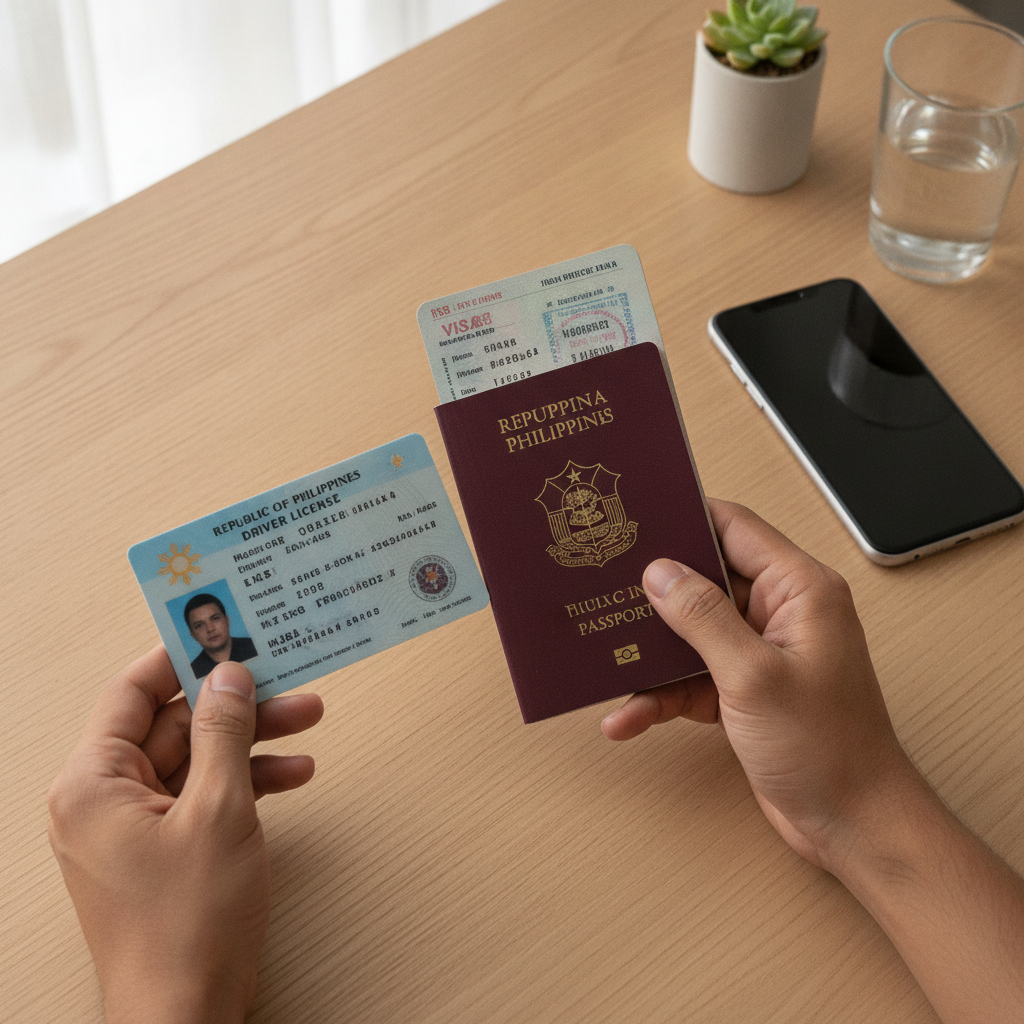
If you've completed the Imperial Gaming register process and made your first deposit, the next step is ID verification. This guide explains exactly which documents Imperial Gaming requires from Filipino players, how to upload them through your account, and what to expect during the verification process.
Why Imperial Gaming Requires ID Verification for Filipino Players
Imperial Gaming asks players to verify their identity for several important reasons. First, the platform must confirm that every user is at least 21 years old—online casino and sports betting services in the Philippines are restricted to adults only.
ID verification also protects your account from unauthorized access. If someone tries to withdraw funds using your GCash, Maya, or bank transfer details, Imperial Gaming can match the withdrawal request against your verified identity documents.
Finally, verification helps prevent fraud and ensures that deposits and withdrawals are processed securely. When you link your e-wallet or bank account to Imperial Gaming, the platform needs to confirm that the account holder matches the registered player.
You can usually play slots, live dealer games, and place sports bets on PBA or NBA matches before completing ID verification. However, Imperial Gaming will require verified documents before processing your first withdrawal. It's best to upload your ID soon after you register so there's no delay when you're ready to cash out.
Accepted Government IDs: Driver's License, Passport, UMID, Postal ID
Imperial Gaming accepts several types of government-issued identification from Filipino players. Your ID must be current (not expired), show your full name, date of birth, and include a clear photo.
Driver's license is one of the most commonly used documents. Make sure both the front and back of your license are visible and that the text is readable. If your license has a newer card format from the Land Transportation Office, photograph it on a flat, contrasting surface so the hologram and printed details are clear.
Philippine passport is accepted and often preferred because it contains your full name, birth date, photo, and passport number on a single page. If you have a valid passport, it can serve as both your primary ID and proof of age in one document.
UMID (Unified Multi-Purpose ID) issued by the Social Security System (SSS) is another widely accepted option. The front of the UMID card displays your photo, full name, and UMID number. Ensure the card hasn't expired and that the barcode and chip are visible if requested.
Postal ID from the Philippine Postal Corporation is accepted as long as it remains valid. This option works well for players who don't have a driver's license or passport. Make sure your Postal ID shows your complete name, birth date, and address.
Other government-issued IDs such as a Professional Regulation Commission (PRC) ID or a valid national ID (PhilSys ID) may also be accepted, but it's best to check the ID upload instructions in your Imperial Gaming account for the most current list.
What won't be accepted: Barangay IDs, school or company IDs, and expired documents are not valid for Imperial Gaming verification. Social media screenshots, photocopies, or edited images will be rejected.
How to Upload Your ID Documents Through Your Account
Once you've gathered your valid government ID, follow these steps to upload it through the Imperial Gaming platform. Most Filipino players complete this process on their Android phones using a mobile browser or the platform's mobile site.
- Log in to your Imperial Gaming account. Use the same Imperial Gaming login credentials you created during registration—your mobile number or email and password.
- Navigate to the account or profile section. Look for a menu icon (usually three horizontal lines) in the top corner of the screen. Tap it and select "Account," "Profile," or "Verification." The exact label may vary, but it's typically found under account settings.
- Select "Verify Identity" or "Upload ID." You'll see a prompt explaining that you need to upload a government-issued ID. Some platforms will ask you to choose the type of ID first (driver's license, passport, etc.).
- Take a clear photo or select an existing image. If you're on a mobile phone, the platform will often let you use your camera to take a photo directly. Make sure the lighting is bright and even, the ID lies flat, and all four corners of the document are visible in the frame. Avoid shadows, glare, or blurry images. If you already have a high-quality photo saved on your device, you can upload that instead.
- Upload the front and back of your ID. For cards like a driver's license or UMID, you'll need separate images of both sides. For a passport, one clear photo of the information page is usually enough.
- Review and submit. Before you tap "Submit" or "Upload," double-check that your full name, birth date, and photo are clearly visible. Blurry or cropped documents will be rejected, and you'll have to resubmit.
After you submit, you'll typically see a confirmation message that your documents are under review. Keep an eye on your registered email address or SMS notifications, as Imperial Gaming may contact you if there's an issue with your upload.
Proof of Address Requirements and Typical Verification Timeframes
In addition to a government ID, Imperial Gaming may ask for proof of address to confirm that your registered details match your billing or e-wallet information. This is especially common if you're using GCash, Maya, or a bank account linked to a specific address.
Accepted proof-of-address documents usually include:
- Recent utility bill (electricity, water, internet) showing your name and address, dated within the last three months
- Bank statement with your name and address, issued within the past three months
- Barangay certificate or clearance showing your current address
- Government correspondence or official mail addressed to you
Take a clear photo or scan of the document, making sure your full name, address, and the issue date are visible. Upload it through the same verification section where you submitted your ID.
Verification timeframes can vary. In many cases, Imperial Gaming reviews and approves documents within 24 to 48 hours. During busy periods—such as after a major PBA playoff series or an NBA finals game when new players are registering—it may take up to 72 hours.
If your documents are rejected, you'll usually receive an email or in-app notification explaining why. Common reasons include expired IDs, unclear images, or a mismatch between the name on your ID and the name you used when you registered. Simply resubmit clear, valid documents to move forward.
Once your account is verified, you'll be able to withdraw winnings to your GCash or Maya e-wallet, request a bank transfer via InstaPay or PESONet, and enjoy full access to all features—from peso slots and jackpot games to live dealer tables and sports betting on volleyball, PBA, and NBA.
Responsible Gambling Reminder
Imperial Gaming is available to Filipino players aged 21 and over only. ID verification helps the platform enforce this age requirement and protect younger individuals from accessing real-money gambling.
Online casino games, live dealer tables, and sports betting should always be treated as entertainment, not a way to make money. Set a budget before you play, never chase losses, and take breaks if gambling stops being fun. If you or someone you know needs support, resources are available through local and international responsible gambling organizations.
By completing ID verification early, you'll enjoy a smoother experience on Imperial Gaming—from your first PHP 100 deposit to your first winning withdrawal.